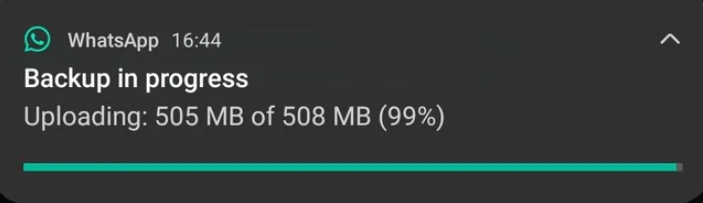
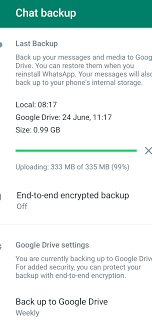
If your WhatsApp backup is stuck at 99%, it does not mean your chats are lost. In most cases, WhatsApp is still processing the final stage of the backup, which usually involves verifying or uploading large media files such as videos, voice notes, and images. This stage often takes longer than expected and can appear frozen, especially on slower networks or devices with limited storage.
For users in Nigeria and similar regions, this issue is even more common due to unstable internet connections, limited cloud storage, and phones filled with years of WhatsApp media. Both Android and iPhone users experience this problem, but Android users report it more frequently because WhatsApp relies on Google Drive, which has stricter background and sync limitations.
The good news is that WhatsApp backup stuck at 99% is a known and fixable issue. This guide explains the real causes and walks you through safe, tested solutions starting from simple fixes to advanced steps without risking your chat history.
What Causes WhatsApp Backup to Get Stuck at 99%?
Insufficient Phone or Cloud Storage
One of the most common reasons WhatsApp backup stalls at 99% is inadequate storage space. WhatsApp requires almost double the size of your chat data to complete a backup successfully. For example, a 2GB chat history may require over 4GB of free space during the backup process.
On Android, Google Drive’s free 15GB storage fills up quickly, especially if it’s shared with Gmail and Google Photos. On iPhones, iCloud’s free 5GB is often insufficient. When storage runs low, WhatsApp may continue showing 99% without clearly stating that storage is the issue.
Unstable or Slow Internet Connection
WhatsApp backups rely heavily on stable Wi-Fi connections. Large backups containing videos or long voice notes are particularly sensitive to network interruptions. Even a brief drop in connection can cause the process to pause indefinitely at 99%.
In Nigeria, where network congestion is common during peak hours, backups may slow down significantly at night or during heavy usage periods. Mobile data connections are even more unreliable for large backups and should be avoided entirely.
App, OS, or Google Play Services Issues
Outdated versions of WhatsApp, Android OS, iOS, or Google Play Services can interfere with backups. On Android devices, Google Play Services manages cloud sync operations, and any bug or outdated version can prevent WhatsApp from completing the final backup stage.
Users running beta versions of WhatsApp have also reported higher failure rates, as experimental features sometimes introduce backup bugs that are later fixed in stable updates.
Step-by-Step Fixes That Usually Solve the Problem
Restart Your Phone and Check the Basics
The simplest fix is often the most effective. Restarting your phone clears temporary system conflicts and refreshes background services that WhatsApp relies on. After restarting, ensure your phone is connected to strong Wi-Fi, not mobile data.
Next, check your available storage. Make sure you have at least twice the size of your WhatsApp backup available on both your phone and your cloud account. This step alone resolves the issue for many users.
Update WhatsApp and Your Phone Software
Running outdated software increases the chance of backup errors. Open the Google Play Store or Apple App Store and update WhatsApp to the latest version. Also check for system updates on your phone, as newer OS versions often fix background sync and storage bugs.
On Android, updating Google Play Services is especially important. Many users report that backups stuck at 99% resume immediately after Play Services updates.
Clear WhatsApp Cache (Android Only)
Clearing cache does not delete chats and is safe. Go to Settings → Apps → WhatsApp → Storage → Clear Cache. This removes temporary files that may be corrupt or blocking the backup process.
Avoid clearing “data” unless instructed, as that can remove app settings. Cache clearing alone fixes a large percentage of Android backup issues.
Advanced Solutions for Persistent Backup Issues
Fixes for Android (Google Drive Backup)
If basic steps fail, remove and reconnect your Google account inside WhatsApp backup settings. This refreshes authentication and resolves sync conflicts. Also confirm that WhatsApp has permission to access Google Drive.
In stubborn cases, uninstalling WhatsApp and reinstalling it may help but only do this after confirming a recent backup exists. During reinstallation, WhatsApp will prompt you to restore from Google Drive.
Fixes for iPhone (iCloud Backup)
For iPhone users, toggling iCloud Drive and WhatsApp permissions often resolves the 99% issue. Go to Settings → Apple ID → iCloud, turn iCloud Drive off and back on, then retry the backup.
Another effective method is offloading WhatsApp (not deleting). This removes the app while keeping its data intact, allowing iOS to rebuild system connections during reinstallation.
Frequently Asked Questions (FAQs)
Why does WhatsApp always stop at 99% and not 100%?
The final 1% usually involves verifying and uploading media files. This step takes longer and is more sensitive to errors.
Will I lose my chats if I cancel the backup?
Canceling does not delete existing chats, but uninstalling WhatsApp without a backup can cause permanent loss.
How long should I wait before assuming it’s stuck?
Large backups can take several hours. If it hasn’t moved after 6–12 hours on stable Wi-Fi, try the fixes above.
Important Things to Keep in Mind Going Forward
WhatsApp backup issues are frustrating, but they are rarely permanent. Most backups stuck at 99% are caused by preventable issues like limited storage, unstable networks, or outdated apps. Understanding how the backup process works helps you respond correctly instead of making rushed decisions that could risk your data.
Building better habits makes a huge difference. Regular backups keep file sizes manageable, while deleting unnecessary media reduces stress on the system. Keeping your apps and phone software updated ensures compatibility with WhatsApp’s cloud services, which change frequently.
For Nigerian users especially, choosing reliable Wi-Fi times and monitoring cloud storage is critical. Backups done during off-peak hours are more likely to complete successfully without interruptions. If you rely on WhatsApp for business, education, or client communication, treating backups as a routine task not an emergency protects your information long-term.
At Naijafix, the goal is not just to help you fix issues, but to help you avoid them in the future. When you understand why WhatsApp backup problems happen and how to handle them safely, you stay in control of your data instead of reacting out of fear. A backup stuck at 99% is almost always temporary with the right steps, your chats remain safe and recoverable.
Author & Publishing Information

Written by Naijafix Editorial Team — Mobile Troubleshooting & Digital Solutions
Published: January 2025
Last Updated: January 2025