Few phone problems are as confusing as seeing a “Storage Almost Full” warning when your gallery, videos, and apps look almost empty. Many users delete photos, uninstall apps, and still see no improvement. This situation is extremely common on both Android and iPhone, and in most cases, your files are not really gone, they’re just hidden.
What usually fills up your storage is not personal content like pictures or videos, but system data, app cache, temporary files, logs, and leftover junk that your phone doesn’t clearly show. These hidden files can quietly grow into tens of gigabytes, especially on phones used for WhatsApp, Instagram, TikTok, Chrome, or streaming apps.
The good news is that this issue is rarely caused by a virus or permanent damage. With the right steps, you can recover a lot of space safely without deleting important data.
What “Other” and “System Data” Really Mean
When you check your storage breakdown, Android often shows a large “Other” category, while iPhones display “System Data.” These labels confuse users because they don’t explain what’s actually inside.
This space usually contains app cache files, thumbnails, temporary downloads, update leftovers, crash logs, and background system data. Messaging apps like WhatsApp alone can store gigabytes of hidden thumbnails and voice note previews even after chats are deleted.
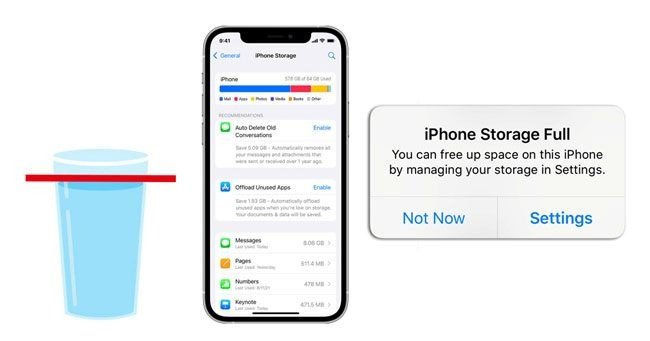
On iPhones, System Data can suddenly balloon after iOS updates, failed backups, or streaming activity. Apple does not give users a direct “clear system data” button, which makes the problem feel worse but it can still be reduced safely.
Why This Happens So Often (Especially Over Time)
Phones are designed to cache data to make apps load faster. Over months or years, this cached data accumulates silently. If apps crash, updates fail, or downloads are interrupted, incomplete files are left behind and never removed automatically.
Power interruptions, low storage warnings, and forced shutdowns can also corrupt storage indexes. When this happens, your phone may report space as “used” even though the files no longer exist in a visible form.
This problem is more common on devices with smaller storage (32GB–64GB) and on phones that haven’t been restarted or maintained regularly.
First Things to Check Before Deleting Anything
Start by going to Settings → Storage (Android) or Settings → General → iPhone Storage (iPhone). Look closely at how much space “Other” or “System Data” is using. If it’s unusually large, that’s your real problem.
Next, restart your phone. A simple restart forces the system to re-index storage and can sometimes free a few gigabytes instantly, especially after deletions or updates.
Also check “Recently Deleted” folders in Photos, Files, or Gallery apps. Many phones keep deleted files for 30–90 days, and they still count toward storage.
Quick Fixes That Usually Free Space Immediately
On Android, go to Settings → Apps → Storage and clear cache for large apps like WhatsApp, Chrome, Instagram, Facebook, and YouTube. Clearing cache does not delete chats or personal data.
Using Files by Google is one of the safest ways to remove junk files automatically. It identifies unused cache, duplicate files, and temporary data without touching important content.
On iPhone, clearing Safari data, offloading unused apps, and deleting old iOS update files can significantly reduce System Data. Restarting after these steps helps the system clean up further.
Advanced Fixes for Android Phones
If cache clearing isn’t enough, booting into Recovery Mode and wiping the cache partition (not factory reset) can remove deep system junk. This does not erase personal data.
You can also use a file manager to show hidden files and manually delete leftover folders from apps you no longer use. Be careful to avoid deleting system folders you don’t recognize.
As a last resort, backing up your data and performing a factory reset almost always fixes phantom storage issues. This is effective, but only recommended if other methods fail.
Advanced Fixes for iPhones
For iPhones, one effective method is offloading apps instead of deleting them. This removes app data while keeping documents intact.
Another commonly used workaround is the date-change trick, which forces iOS to clear temporary system files. While unofficial, many users report it reduces System Data significantly.
If System Data remains extremely large (50–100GB), backing up your iPhone and restoring it through a computer often resets storage properly without data loss.
When Storage Issues Point to Something More Serious
If storage keeps filling up rapidly even after cleanups, it may indicate corrupted storage memory or a failing internal chip. This is rare but possible, especially on older phones.
Signs include constant reappearance of junk files, apps crashing frequently, or storage usage changing randomly. In such cases, professional diagnosis is safer than repeated resets.
Always back up your data before attempting advanced fixes, especially if your phone shows unusual behavior beyond storage warnings.
How to Prevent This Problem Going Forward
Restart your phone at least once a week to allow the system to clean temporary files. Clear app cache monthly, especially for social and messaging apps.
Avoid installing unnecessary apps, and keep your operating system updated to benefit from storage optimization improvements. Periodically check storage breakdowns so hidden data doesn’t surprise you.
Cloud backups help, but remember that cloud sync can also create local cached copies. Managing sync settings reduces duplicate storage usage.
What This Problem Really Teaches About Phone Storage
When a phone says storage is full but nothing is visible, it’s rarely lying, it’s just not explaining itself clearly. Modern smartphones generate a lot of background data that users never see, yet it counts just the same.
Understanding how storage actually works gives you control instead of frustration. Instead of deleting memories or uninstalling useful apps, you can target the real cause and reclaim space safely.
At Naijafix, the goal is not just to help you free storage once, but to help you avoid the problem entirely by knowing what builds up quietly and how to manage it before it becomes a crisis.
By Naijafix Tech Desk
Updated for 2026 | Mobile Storage & Phone Fixes