In the 2026 Nigerian telecommunications environment, appearing as a “Private Number” or “Unknown Caller” during an outgoing call can be a significant professional and social barrier. Most recipients in Nigeria are wary of answering anonymous calls due to the prevalence of phone-based scams and unsolicited marketing. When your number is hidden, it is often because the Caller ID restriction feature was either intentionally or accidentally activated on your SIM card or within your smartphone settings. Whether you are using a major provider like MTN, Airtel, or Glo, the process to remove private number status is generally straightforward and involves either a network-level command or a simple menu adjustment on your handset.

Ensuring your number is visible is particularly important when applying for services that require identity verification. For instance, when using the best loan apps in Nigeria, lenders may need to call you for follow-up questions, and an anonymous call might be automatically blocked by their security systems. Similarly, students attending the largest universities in Nigeria often need to communicate with faculty or administrative offices where transparency is expected. Having a visible number builds trust and ensures that your calls are treated with the priority they deserve.
The Fastest Method: Using USSD Network Codes
The most efficient way to handle Caller ID issues across all Nigerian networks is through the use of Unstructured Supplementary Service Data (USSD) codes. These codes interact directly with your service provider’s billing and configuration system, bypassing the need for complex menu navigation. To instantly deactivate the hiding of your number, you should dial *31# and press the call button. You will typically receive a confirmation message stating that the outgoing caller ID service has been disabled. This command is a universal standard for Nigerian networks and works regardless of whether you are on a 4G or 5G connection.
If you ever need to check your current status to see if your number is hidden, you can dial *31#. Understanding these USSD codes is a vital skill for mobile users in Africa, as it allows for offline management of your line settings. Conversely, if you wish to hide your number for a single specific call, you can dial *31# followed by the recipient’s phone number. However, for permanent visibility, the simple *31# command is your primary tool. Maintaining a visible number is also helpful when you buy cheap MTN data or manage subscriptions, as it prevents confusion during automated service interactions.
Step-by-Step Instructions to Restore Number Visibility
To restore your number visibility using the USSD method, you should start by opening your phone’s dialer and entering the code *31#. Once you press the call button, your network provider will process the request and disable the caller ID restriction for all subsequent outgoing calls. For users who prefer adjusting their device hardware settings, the process on a Samsung Galaxy begins by opening the Phone application and tapping the triple-dot icon to access Settings. From there, you must navigate to the Supplementary Services menu and select ‘Show my caller ID’ followed by the ‘Network default’ option to ensure your number is broadcast correctly.
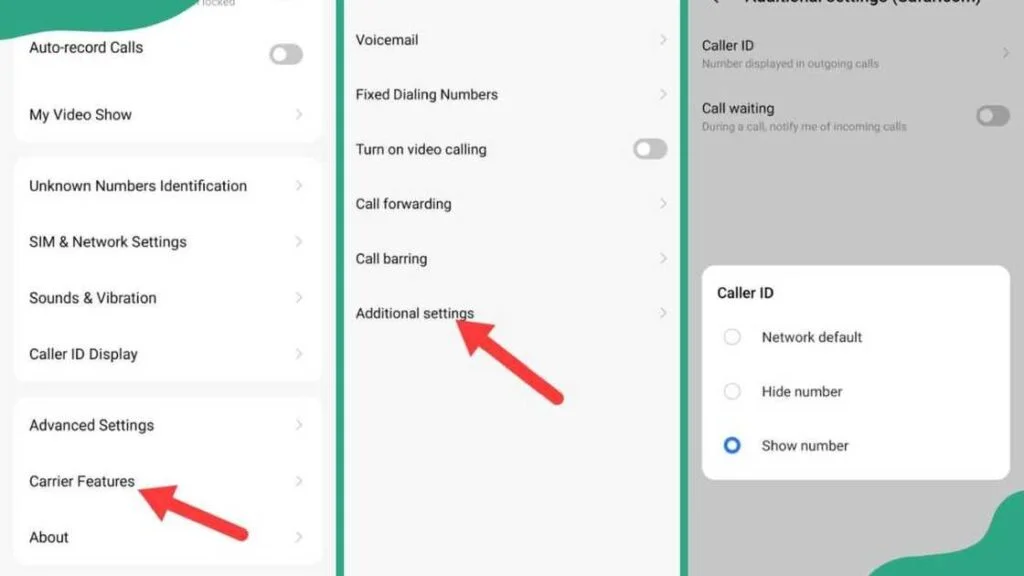
On Infinix and Tecno devices, the steps involve going into the dialer settings, selecting SIM card settings, and then choosing the specific SIM line before navigating to Additional Settings to toggle the Caller ID visibility to ‘Show number.’ iPhone users can achieve the same result by opening the main Settings app, scrolling down to the Phone section, and ensuring the ‘Show My Caller ID’ toggle is switched to the on position. Finally, it is highly recommended to verify the change by dialing *31# to check your current status or by making a test call to a friend to confirm that your mobile identity is now properly displayed.
Adjusting Settings on Samsung and Android Devices
For users of Samsung Galaxy smartphones, which hold a massive market share in Nigeria, the fix is located deep within the “Supplementary Services” menu. You must open your Phone app, tap the three dots in the top right corner, and navigate to “Settings.” From there, select “Supplementary services” and then tap on “Show your caller ID.” To ensure your number is always visible, you should select the “Network default” or “Show number” option. This ensures that your device always follows the standard visibility protocols of the best network in Nigeria 2026 that you are currently using.
For other Android users, particularly those with Google Pixel or Xiaomi devices, the path involves going to Call Settings and looking for “Additional Settings.” Once inside, the Supplementary Services menu will allow you to toggle the Caller ID visibility. It is a common mistake for users to accidentally select “Hide number” while exploring their privacy settings, leading to weeks of unanswered calls. Resetting this to the network default usually resolves the problem immediately without requiring a restart of the device.
Infinix, Tecno, and itel Specific Instructions
In Nigeria and across West Africa, brands like Tecno, Infinix, and itel are incredibly popular due to their localized features and affordability. On these devices, the menu structure for Caller ID is often found under “Carrier Features.” You should open your dialer, tap the settings gear icon, and look for “SIM card settings.” After selecting the active SIM, navigate to “Additional settings” where the “Caller ID” option resides. Selecting “Show number” here will remove private number on android settings and restore your caller identity to all your contacts.
If your phone is a dual-SIM model, which is the standard for most Nigerian professionals, you must remember to check these settings for each SIM card individually. It is possible for one line to show your number while the other remains private. This can lead to confusion if you use one line for work and the other for personal matters. Keeping both lines set to “Network default” ensures a consistent experience across all your communications, preventing the “Unknown” label from appearing on your friends’ or colleagues’ screens.
Frequently Asked Questions
Does it cost money to unhide my number in Nigeria?
No, using the *31# code or changing your phone settings to show your number is a completely free service provided by all Nigerian mobile operators. You do not need to have an active airtime or data balance to perform these actions, as they are part of the basic signaling features of the GSM network.
Why does my number still show as private after I dialed the code?
If the *31# code and the internal settings do not work, it is possible that your service provider has a network-level restriction on your line. This occasionally happens with certain corporate lines or newly registered SIM cards. In such cases, you should contact your network’s customer care dialing 300 for MTN, 111 for Airtel, or 121 for Glo and request that they reset your Caller ID preferences.
How do I block incoming private calls from scammers?
While this guide focuses on your outgoing identity, you can protect yourself from incoming anonymous calls by using the “Block unknown callers” feature in your phone’s settings. Most modern Android and iOS devices have a specific toggle that will automatically silence or reject any call that does not display a number. This is highly recommended for Nigerian users who frequently deal with automated spam or fraudulent calls.
Is there a way to hide or show my number using these Caller ID codes permanently?
Yes, the USSD commands are designed to set a permanent state for your line. If you dial *31#, your number will remain hidden for all outgoing calls until you manually dial *31# to reverse the setting. This gives you full control over your privacy without having to dive into the settings menu every time you make a call.
Optimizing Your Mobile Communication Strategy
Resolving caller identity issues is a fundamental step in mastering your digital presence in Nigeria’s fast-paced economy. Whether you are a business owner in Lagos or a student in Zaria, the clarity of your communication dictates how others perceive your reliability and professionalism. Beyond just showing your number, you should also consider the quality of your connection and the stability of your service provider. Transitioning between 4G and 5G networks can sometimes reset certain temporary settings, so it is wise to periodically check your caller visibility status, especially after a major system update or a switch in your primary data provider.
As we progress through 2026, the importance of transparent digital identity will only continue to grow. Regulatory bodies like the NCC are increasingly pushing for measures that reduce anonymity in the telecom space to combat the rise of digital fraud. By taking the initiative to ensure your caller identity is clearly displayed, you are not only making it easier for people to reach you but also participating in a more secure and trustworthy national communication ecosystem. Keeping your mobile tools properly configured ensures that you stay connected to your network of family, friends, and professional opportunities with absolute confidence.
SEO Meta Setup (RankMath Panel)
Focus Keyword: Remove private number Nigeria
SEO Title: How to Remove Private Number in Nigeria 2026: MTN, Airtel & Glo
Meta Description: Stop your calls from showing as Unknown or Private Number in Nigeria. Learn the USSD codes and settings for Samsung, Tecno, and Infinix to show your caller ID.
URL Slug: remove-private-number-nigeria-guide