If your phone shows the charging icon but the battery percentage stays the same or even drops this usually means power is not reaching the battery effectively or the phone is misreporting battery levels. In most cases, the problem is not serious and can be fixed without replacing the phone.
The most common causes are faulty charging cables or adapters, dirty charging ports, worn-out batteries, or software glitches. Many users panic when they see the percentage stuck at 0%, 80%, 87%, or 99%, but these numbers often point to specific, fixable issues.
Understanding why this happens helps you avoid unnecessary repairs, wasted money, or risky fixes suggested online.
What This Problem Really Means (Charging vs. Power Delivery)
Seeing the charging symbol only means your phone detects a power source; it does not guarantee that enough power is entering the battery. If the current is too weak, unstable, or interrupted, the battery level will remain unchanged.
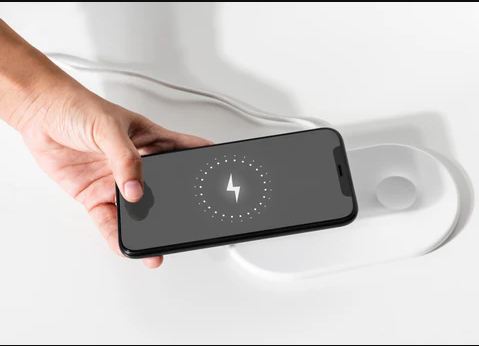
In some situations, your phone may actually be losing power faster than it is gaining it. Background apps, screen brightness, heat, or poor charging accessories can drain energy even while plugged in, creating the illusion that charging is not working.
On iPhones, software features like Optimized Battery Charging may intentionally pause charging at 80% to protect battery health. However, if your phone stays stuck far longer than expected, the issue goes beyond normal behavior.
Most Common Reasons This Happens
Faulty Charging Cable, Adapter, or Power Source
This is the number one cause of the problem. Charging cables wear out internally, even if they look fine outside. Bent pins, loose connectors, or cheap third-party chargers often deliver unstable power.
Low-quality chargers are especially common in regions where uncertified accessories are widely sold. Phones may display “charging” while receiving too little current to increase battery percentage.
Always test with an original or certified charger before assuming the battery is bad.
Dirty or Damaged Charging Port
Dust, lint, and debris collect inside charging ports over time, preventing the cable from making proper contact. This is extremely common and often overlooked.
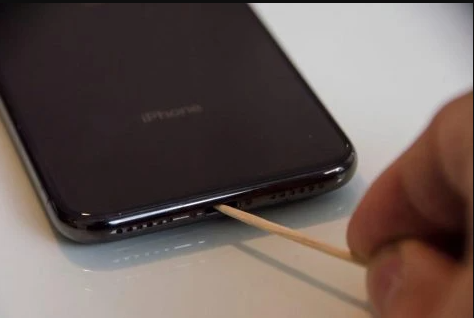
Even a small blockage can reduce power delivery enough to stop the battery from charging properly. Wireless charging users may face similar issues due to poor coil alignment or thick phone cases.
Cleaning the port carefully resolves a large percentage of these cases.
Battery Calibration or Software Errors
Sometimes the battery is charging correctly, but the percentage reading is inaccurate. This happens when the battery sensor loses calibration, often after long usage cycles, sudden shutdowns, or software updates.
Outdated operating systems or corrupted app cache can also cause charging data to display incorrectly. In these cases, recalibrating the battery or updating the software usually fixes the issue.
This category accounts for roughly 20–30% of reported cases.
Battery Health Degradation
Lithium-ion batteries degrade over time. When battery health drops below about 80%, charging becomes slower and less predictable.
Phones with degraded batteries may appear stuck at certain percentages or shut down unexpectedly even when showing remaining charge. On iPhones, this can be checked directly in Battery Health settings.
At this stage, replacement is often the only permanent fix.
Quick Checks You Should Do First
Start by switching to a different charging cable and adapter, preferably an original one. Plug directly into a wall socket rather than a power bank or laptop.
Next, gently clean the charging port using a soft brush or wooden toothpick. Avoid metal objects that could damage internal pins.
Restart your phone and turn on airplane mode while charging for a few minutes. This reduces background drain and helps determine whether power delivery is the issue.
Step-by-Step Fixes for Android Phones
Android devices often experience this problem due to hardware wear or calibration issues.
Begin by draining the battery completely until the phone shuts down. Then charge it uninterrupted to 100%. This recalibrates the battery sensor and resolves many false readings.
You can also check battery information by dialing ##4636## and viewing battery status. If health readings are abnormal or the phone heats excessively while charging, the battery may need replacement.
Booting into Safe Mode can also help identify whether a background app is draining power faster than the charger can supply.
Step-by-Step Fixes for iPhones
On iPhones, first check Settings → Battery → Battery Health. If health is below 80%, charging issues are expected.
Disable Optimized Battery Charging temporarily to see if the phone resumes charging past 80%. This feature pauses charging intentionally, but it should resume automatically under normal conditions.
Updating iOS and resetting all settings (without deleting data) often clears charging-related software bugs. If the issue persists, a battery replacement through an authorized service provider is the safest option.
When Hardware Repair Is the Right Move
If your phone still refuses to increase battery percentage after using known-good chargers, cleaning the port, calibrating the battery, and updating software, hardware wear is likely involved.
Common hardware failures include worn-out batteries, damaged charging ports, or charging IC issues. These problems cannot be fixed with apps or settings.
At this point, visiting a reputable repair center prevents further damage and avoids wasting money on unnecessary accessories.
How to Prevent This Problem in the Future
Always use certified charging accessories and avoid extremely cheap cables. Clean your charging port regularly, especially if you live in dusty environments.
Avoid letting your phone overheat while charging, and do not constantly charge from near-empty to full without breaks. Occasional full discharge cycles help maintain accurate battery readings.
Keeping your operating system updated ensures compatibility with charging optimizations and battery management improvements.
What Really Matters When This Happens
A phone charging without an increasing battery percentage is frustrating, but it rarely means your device is beyond repair. In most cases, the cause is simple and affordable to fix once you identify whether the issue is power delivery, calibration, or battery health.
Rushing into drastic actions like factory resets or phone replacements often creates more problems than it solves. Following a calm, step-by-step approach saves time, money, and stress.
When you understand how charging actually works, you gain control over the situation instead of guessing. That knowledge is what keeps small problems from becoming expensive ones.
Author & Publishing Information

Written by Naijafix Tech Desk — Mobile Troubleshooting & Device Care
Published: 2026
Last Updated: 2026

Naijafix focuses on solving real phone problems faced by everyday users, especially in environments with unstable power, mixed charger quality, and long device usage cycles.